
BidCore · AI workbench for bid responses

Bid on evidence.Write in order.

BidCoreA workbench for response documents, driven by the constraints in your tender.

Desktop app · Generally availableBidCore website

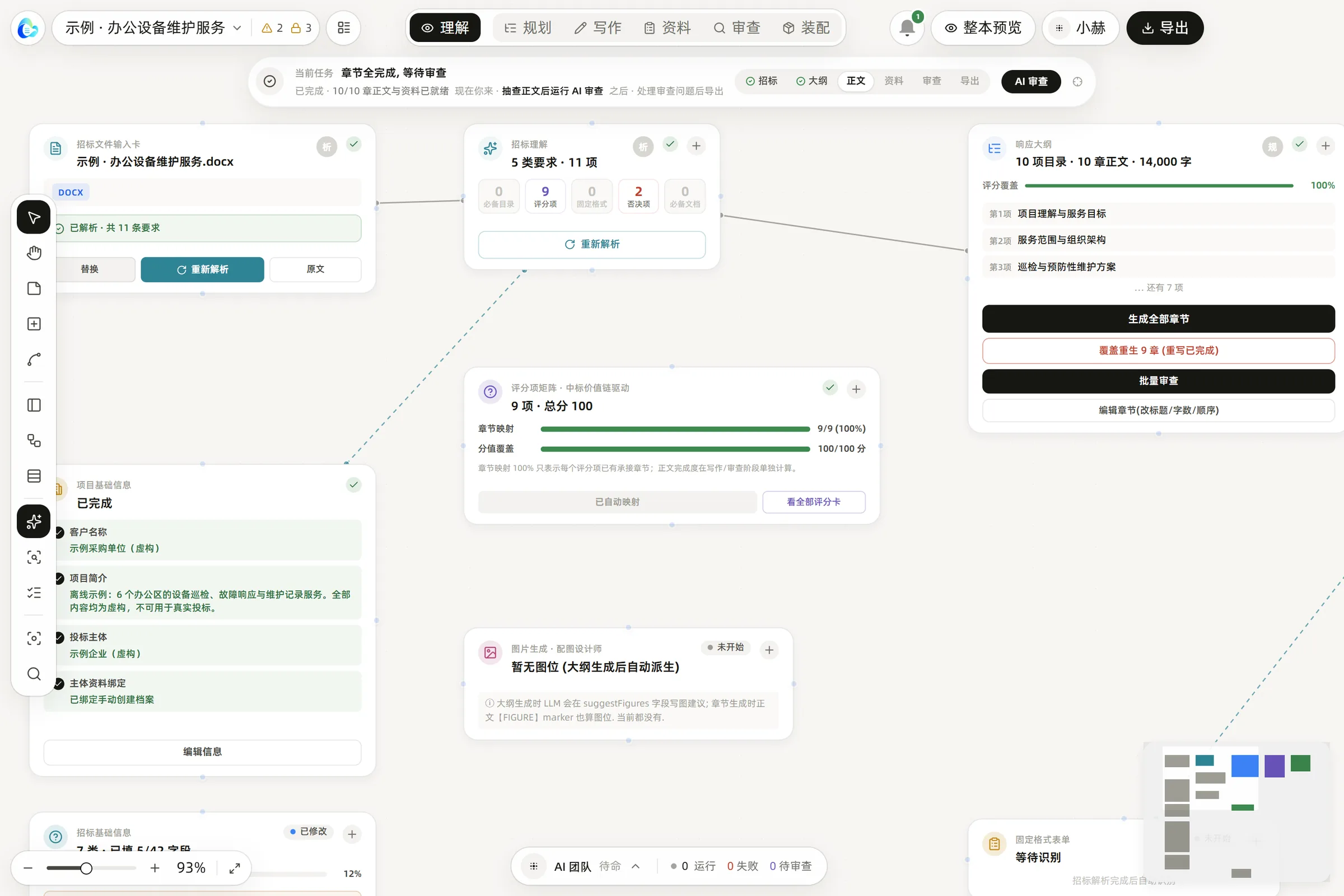
Screenshot of the BidCore app: the canvas shows the tender input card, the tender analysis (5 requirement types, 11 items), the response outline and the scoring matrix; along the top are six modes: understand, plan, write, materials, review and assemble.
The real BidCore app (Chinese UI) · Fictional sample project

01Product

Understand the tender first, then write the bid.

BidCore doesn’t just produce a bid that looks complete. It first works through the tender documents, qualification requirements and scoring criteria, then draws on your company’s real records to plan the response, write the content, add evidence, review risks and deliver the files.

  1. 01Response planning
  2. 02Writing
  3. 03Evidence
  4. 04Risk review
  5. 05Delivery
Form
Canvas-based desktop software
How it runs
Files stay on your computer; AI features call online models
Built for
Bid teams · Bid writers · Small businesses that win work through tenders
Status
Windows desktop app · Generally available

02Workflow

Eight steps, from reading the tender to delivery.

ARead01–03

  1. 01Import the tender documents
  2. 02Identify the project, lots, qualification requirements and scoring items
  3. 03Check your company profile and supporting documents

BAnalyze04

  1. 04Build the response structure and map it to the scoring items

CDraft05–08

  1. 05Generate the outline, body text and standard forms
  2. 06Add attachments, images and evidence
  3. 07Check for fabricated content, deviations and disqualification risks
  4. 08Export a draft, an internal-review version or the final files

Pick a question and watch BidCore work.

Interactive demo · Recreated from the real app (Chinese UI) · Fictional sample

03The difference

When information is missing, BidCore says exactly what’s missing —instead of inventing qualifications, cases, staff or track records for you.

Illustration · One gap, two ways to handle it

What it won’t write

We have completed many similar projects over the past three years, with excellent results.

What it flags instead

Missing: track record for similar projects, past 3 years — not found in company profile

04Privacy & security

Your files stay on your computer. Only what a task needs is sent.

Your computer

Stored locally

  • Tender documents
  • Company profile

Model providers

Stored locally
Projects, tender documents and your company profile are stored on your own computer.
When you use AI
The content a task needs goes through the BidCore server to the model providers (DeepSeek, SiliconFlow). The server records usage only and does not keep the content.

Generative AI service: the model name(s) and filing number(s) will be published before the official launch.

05Pricing & promises

Enterprise licence: one price, three promises.

Enterprise licence / Private deployment

Fixed price

¥199,800/ year

Includes

  • A one-year enterprise licence, or a private deployment
  • Standard setupModelCompany profileBase templatesRemote onboarding

Note: model / API usage fees are charged separately.

Individuals and small teams can buy pay-as-you-go credits on the BidCore website.See pay-as-you-go pricing

  1. P1

    One-page pricing

    Enterprise licence or private deployment: ¥199,800 a year either way, written on this page. No quotes based on who’s asking, no hidden tiers.

  2. P2

    Nobody will chase you

    There’s no sales team — and nobody will call you with a sales pitch.

  3. P3

    Try before you buy

    Run one of your real tenders through the full workflow. We talk about payment only once you’re satisfied.

06Built in

All of this is already built into BidCore.

  • T1Built in

    Requirement extraction

    Pulls qualification requirements, scoring items and key terms out of a tender document.

  • T2Built in

    Response check

    Checks a response document against the tender’s requirements for anything left out.

  • T3Built in

    Workload planning

    Estimates the preparation work by section and material, to help plan people and time.

  • T4Built in

    Price review

    Cross-checks quantities, unit prices and totals in the price schedule.

  • T5Built in

    Scoring plan

    Goes through the scoring criteria and lists what each item needs.

Bring a real tender.Run the full workflow.

Try it once for free and talk about payment only if you’re satisfied — or book a demo first.

BidCore is developed and operated by Changsha Wenshuo Technology Co., Ltd.

Emailcontact@wenshuotech.com

Websitebidcore.wenshuotech.cn

Wenshuo account

Verify your email

Verify once and the same account works across the whole site.